1. A crystal is a table
Six short lessons teach the Python side of MDAPY. Each runs on its own, needs no input files, and ends with something to try. Three ideas carry you through all of them, and this lesson teaches the first two:
- A system is a table of atoms and a box.
- A system never changes. Every change makes a new one.
- Every analysis is used the same way (lesson 2).
Build something and print it
from mdapy.build import build_crystal

crystal = build_crystal("fcc", 3.615, elements="Cu", repeat=(8, 8, 8))
print(crystal)
System: 2048 atoms (Cu2048)
  box:      28.92 × 28.92 × 28.92 Å, orthogonal, periodic x y z
  columns:  positions (3), element
This is the first thing to do with any system: printing it tells you the atoms, the box and the columns you have.
Read a column by its name
Everything about the atoms is a column, and every column is read the same way. You get a NumPy array, one row per atom:
crystal["positions"]  # (2048, 3), in Å
crystal["positions.z"]  # one component, (2048,)
crystal["element"]  # ['Cu', 'Cu', ...]
crystal["positions.x**2 + positions.y**2"]  # an expression over the columns
crystal.box.volume  # in ų
Change it: you get a new system
Give some atoms another element with with_columns. The arrays can be any
NumPy array with one value per atom:
import numpy as np

rng = np.random.default_rng(0)
alloy = crystal.with_columns(element=rng.choice(["Cu", "Ni"], len(crystal)))
print(alloy)
System: 2048 atoms (Ni1066 Cu982)
  box:      28.92 × 28.92 × 28.92 Å, orthogonal, periodic x y z
  columns:  positions (3), element
crystal is still pure copper. Since nothing changes behind your back, you
can keep the systems of every step and compare them.
Select atoms
filter keeps the atoms that meet a condition, written as you would say it:
top = alloy.filter("positions.z > 20")
nickel = alloy.filter(element="Ni")
top_nickel = alloy.filter("positions.z > 20", element="Ni")
print(len(top), len(nickel), len(top_nickel))
The table is a polars DataFrame
For anything else, system.table is a polars DataFrame:
shape: (2, 2)
┌─────────┬──────┐
│ element ┆ len  │
│ ---     ┆ ---  │
│ enum    ┆ u32  │
╞═════════╪══════╡
│ Ni      ┆ 1066 │
│ Cu      ┆ 982  │
└─────────┴──────┘
Look at it, and save it
render draws a system. atoms chooses which atoms to show, so a mask of the
atoms with small x cuts the crystal open:
from mdapy.visualization import render

render(
    alloy,
    "images/alloy.png",
    atoms=alloy["positions.x"] < 15,
    width=900,
    height=600,
    legend=True,
)
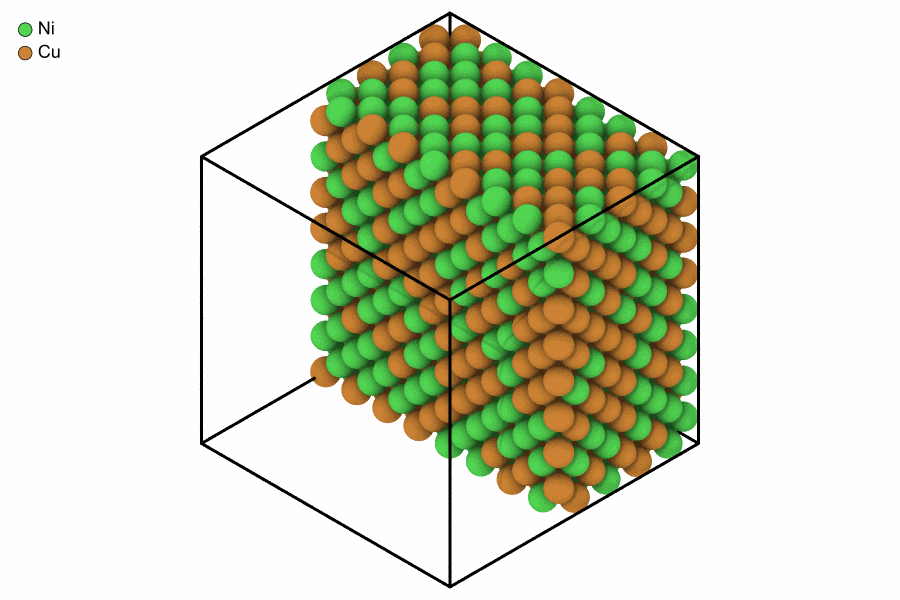
Copper and nickel at random on an fcc lattice, the half with x below 15 Å.
mdapy.io.write and mdapy.io.read take any common format, chosen by the name of the
file:
from mdapy.io import read, write

write("alloy.xyz", alloy)
back = read("alloy.xyz")
print(len(back))
Try it
- Build bcc tantalum with a lattice constant of 3.303 Å.
- Add a column
layerwith the integer part of z divided by 3.303, and color the picture by it withcolor="layer"and the discretecolormap="labels".
An answer
Next: asking the atoms questions. The reference pages for this lesson are Systems, Changing a system, Selecting and ordering atoms and Rendering.