Quick tour
This page builds a small copper crystal, writes and reads it, finds its neighbors, computes its energy with a potential, relaxes it and writes the result. Every block runs as shown, in order. To learn step by step instead, start with the lessons.
A system
A System holds the atoms, as a table of columns, and the simulation box.
import numpy as np
import mdapy as mp
from mdapy.build import build_crystal

a = 3.615  # Å
system = build_crystal("fcc", a, elements="Cu", repeat=(3, 3, 3))
len(system), system.box.volume  # 108 atoms, Å^3
See Systems and topology and Simulation box.
Files
from mdapy.io import read, write

write("copper.xyz", system)
back = read("copper.xyz")
np.abs(back["positions"] - system["positions"]).max()  # 0.0
See Reading and writing files and, for a whole trajectory, Trajectories.
Neighbors
nl = mp.NeighborList.build(system, 3.0)
nl.counts  # 12 neighbors for every atom of fcc
nl.distances.min()  # a / sqrt(2)
See Neighbor lists.
Energy and forces
from mdapy.calculators import EAM

potential = EAM.zhou(["Cu"])
result = potential.compute(system, ("energy", "forces", "virial"))
result.energy / len(system)  # eV per atom
result.stress  # (3, 3) GPa
See Calculators and EAM.
Relaxation
The atoms are displaced at random, then the positions and the box relax to the nearest minimum of the energy.
from mdapy.simulation import minimize

rng = np.random.default_rng(0)
rattled = system.with_columns(
    positions=system["positions"] + rng.normal(scale=0.05, size=(108, 3))
)
relaxed = minimize(rattled, potential, cell="full")
relaxed.converged, relaxed.energy, relaxed.stress
write("relaxed.xyz", relaxed.system)  # with forces, energy and stress
See Energy minimization.
Analysis and pictures
A polycrystal, its grain boundaries found by common neighbor analysis and drawn by the ray tracer:
from mdapy.build import build_polycrystal
from mdapy.identify import CommonNeighborAnalysis
from mdapy.visualization import render

grains = build_polycrystal(
    build_crystal("fcc", a, elements="Cu"), mp.Box(60.0), 6, seed=4
)
structures = CommonNeighborAnalysis().compute(grains)
structures.counts()  # fcc, and other at the boundaries
render(
    grains,
    "images/quick-tour.png",
    atoms=grains["positions"][:, 0] < 30,  # the half at x < 30 Å
    color=structures,
    style="matte",
    width=900,
    height=600,
    legend=True,
)
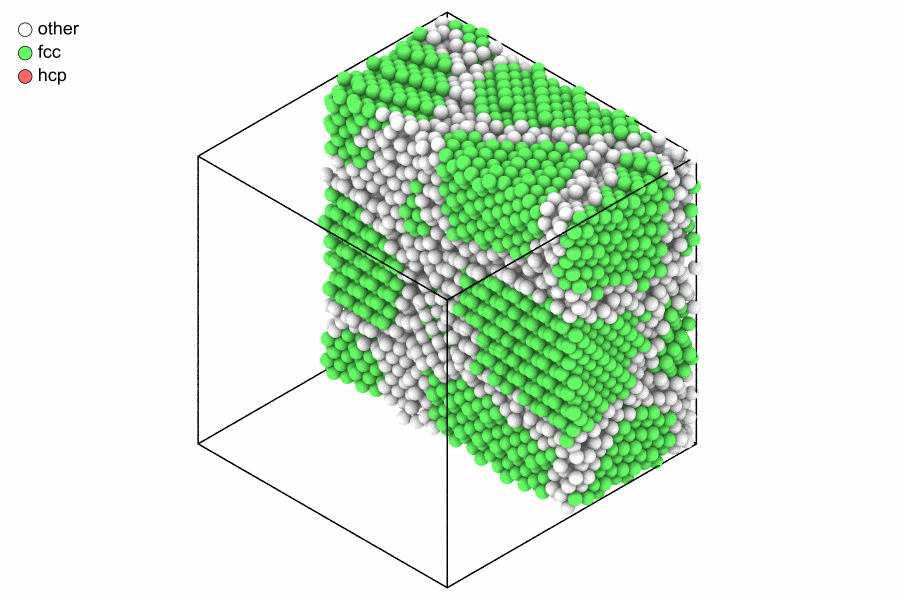
Six grains of copper cut in half: fcc atoms green, grain boundaries white, in the matte style.
See Building structures, Common neighbor analysis and Rendering.