Coloring atoms
Three functions color the atoms of a system and keep the colors in its
color column, which render draws by default and the next
coloring starts from:
| Function | Colors | As OVITO's |
|---|---|---|
color_coding(system, column, colormap="rainbow", value_range=None, *, atoms=None) |
by the values of a column through a colormap | color coding |
color_by_type(system, column, *, atoms=None) |
one color for each value of a column | color by type |
assign_color(system, color, *, atoms=None) |
in one color | assign color |
Each colors all atoms, or those given as atoms, a mask such as
System.where gives, or indices;
the others keep the colors they had.
import numpy as np
from mdapy.build import build_crystal
from mdapy.visualization import (
    assign_color,
    atom_colors,
    atom_radii,
    color_by_type,
    color_coding,
    render,
)

alloy = build_crystal("fcc", 3.6, elements="Cu", repeat=(8, 8, 8))
rng = np.random.default_rng(7)
alloy = alloy.with_columns(element=rng.choice(["Cu", "Ni", "Al"], size=len(alloy)))

by_height = color_coding(alloy, "positions.z")  # rainbow from bottom to top
by_element = color_by_type(alloy, "element")
layer = alloy.where("positions.z > 12 and positions.z < 16")
marked = assign_color(by_element, "#222222", atoms=layer)
The three systems drawn:
from mdapy.visualization import write_png

options = dict(view="iso", width=400, height=400)
write_png(
    "images/colors.png",
    np.hstack([render(by_height, **options), render(by_element, **options),
               render(marked, **options)]),
)  # fmt: skip
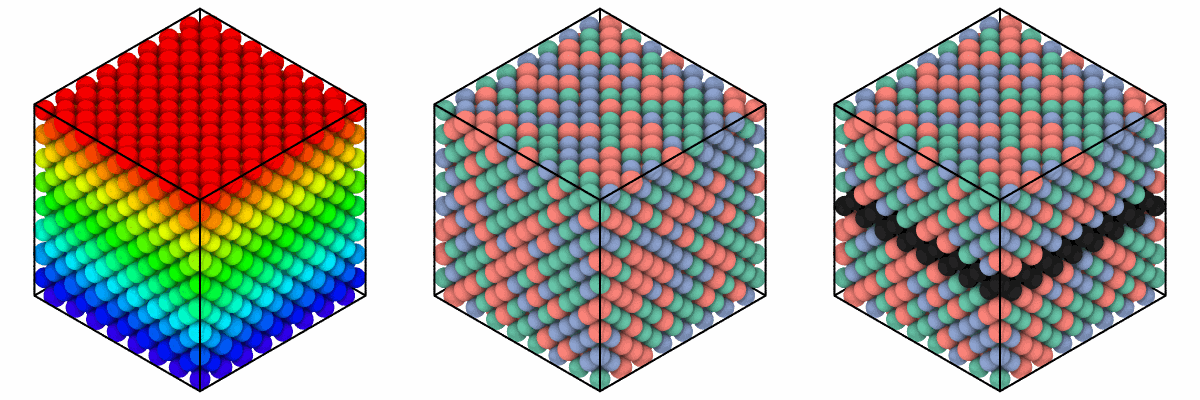
Left: rainbow from the lowest to the highest z. Middle: one color for each of Al, Cu and Ni. Right: a layer in dark gray over the colors by element.
Parameters
| Name | Type | Default | Meaning |
|---|---|---|---|
column |
str | for color_coding, a column of numbers, a component such as "velocities.z" or an expression; for color_by_type, a column of one component, such as "element", "type" or "cluster", or an expression |
|
colormap |
str | "rainbow" |
one of COLORMAPS |
value_range |
(float64, float64) | finite range | the values at the ends of the colormap; by default the lowest and highest finite value of the atoms colored; values beyond take the color of their end |
color |
color | "#rrggbb", a name such as "red", or three numbers from 0 to 1 |
|
atoms |
mask or indices | all | the atoms colored |
color_by_type gives the values, in increasing order, the colors of
LABEL_COLORS in turn: twelve distinct colors, the thirteenth value taking
the first again.
Results
Each returns the system with the (N, 3) colors from 0 to 1 in its color
column; its other columns as they are.
The colors and radii of atoms
atom_colors(system, color=None, *, colormap_name="viridis",
value_range=None, elements=None)
gives the (N, 3) colors render draws:
those of color as render takes it, by default
the color column, or without one the colors of the elements, those given
in elements, such as {"Cu": "#d4875a"}, in place of their own.
atom_radii(system, radius="display", *, elements=None, scale=1.0) gives
the (N,) radii in Å: the radius column, or without one those of the
elements ("display", "covalent" or "vdw"), those given in elements
in place of their own; each times scale.
A system with a type column and no element column, as a LAMMPS dump of
id type x y z, has its atom types in place of the elements, named Type 1,
Type 2 and so on: each in a color of its own, as OVITO's, type k taking
TYPE_COLORS[(k - 1) % 9], and all of one radius, as types say nothing of
their sizes. elements takes those names, such as {"Type 2": "#222222"};
atom_names(system) gives the name of each atom, atoms of the element X
named after their type too.
To give the types their elements, read the file with
elements=: the colors and radii are
then those of the elements, and files written from it hold them.
from mdapy.io import read_trajectory, write
from mdapy.visualization import atom_names

typed = alloy.with_columns(type=np.arange(len(alloy)) % 2 + 1).drop("element")
write("types.dump", typed)
frames = read_trajectory("types.dump", elements=["Cu", "X"])
print(sorted(set(atom_names(frames[0]))))  # ['Cu', 'Type 2']
colors = atom_colors(alloy, elements={"Al": "#9ecae1"})
radii = atom_radii(alloy, elements={"Al": 1.0}, scale=0.8)
picture = render(alloy, color=colors, radius=radii, width=400, height=400)
Errors
InvalidParameter for an unknown colormap or color, a column of text for
color_coding, a column of several components, or a wrong mask.
See also
- OVITO Color coding, Color by type and Assign color.